
iPhone 17 Repair & Features: Ultimate Guide for Owners & Repair Shops

1. Introduction
The launch of the iPhone 17 series has created a new wave of curiosity — not just from buyers wanting the latest model, but also from repair professionals and owners concerned about durability, repairability, and serviceability. As a phone repair shop, providing your audience with an authoritative, detailed guide on iPhone 17 features and how to repair them positions you as a go-to resource.
This article aims to:
Explain the standout features of the iPhone 17
Dive deep into how Apple’s internal changes affect repairability
Highlight common repair issues to expect
Offer best practices, pricing guidance, and why an expert repair matters
Let’s start by exploring what makes the iPhone 17 tick.
2. iPhone 17 at a Glance: Key Features & Specs
Here’s a summary of the major specs and features of the iPhone 17 (and, where relevant, Pro/Pro Max variants):
Feature | iPhone 17 / 17 Pro / Pro Max / iPhone Air* |
Release Date | September 19, 2025 MacRumors+4Apple+4T-Mobile+4 |
Base Storage | 256 GB, with higher tiers (512 GB, 1 TB, even 2 TB on Pro Max) Apple+2T-Mobile+2 |
Display | Super Retina XDR OLED, ProMotion (adaptive refresh up to 120 Hz) MacRumors+3Verizon+3Apple+3 |
Camera System | Dual 48 MP system (Fusion main + ultra-wide) for base iPhone 17; Pro models add a telephoto and more advanced features T-Mobile+3Apple+3MacRumors+3 |
Front Camera | 18 MP with Center Stage (auto-framing) Apple+2T-Mobile+2 |
Battery & Charging | USB-C fast charging + MagSafe / Qi wireless; Apple claims up to ~50% in 20 minutes with a 40 W+ charger Apple+3Wikipedia+3T-Mobile+3 |
Cooling & Internal Architecture | Vapor chamber cooling (in Pro models) and new battery tray with electrically debonding adhesive Wccftech+2MacRumors+2 |
Design & Build | Aluminum unibody, Ceramic Shield, water resistance up to 6 meters for 30 minutes T-Mobile+2Apple+2 |
Network / Wireless | Likely support for latest standards (Wi-Fi, Bluetooth, 5G) — Apple often pairs new iPhones with updated connectivity chips Apple+2Wccftech+2 |
* The iPhone Air is an ultra-thin variant introduced alongside the 17 series. Some specs differ (e.g. battery, form factor). WIRED+2Apple+2
3. What’s New in iPhone 17 (vs iPhone 16)
To appeal to users considering upgrades or curious about changes, highlight what’s different:
Bigger base storage: Apple doubled or improved starting capacity compared to earlier models.
120 Hz ProMotion on base iPhone: What used to be reserved for Pro models is now standard.
Improved camera system: The “Dual Fusion” 48 MP setup allows for better image quality, improved low-light performance, and more versatility. T-Mobile+4Apple+4MacRumors+4
Enhanced cooling (Pro models): Implementation of a vapor chamber allows better heat dissipation under heavy loads (e.g. gaming, video editing). Wccftech+1
New battery design: The shift to a screwed-in battery tray with electrically debonding adhesive makes battery replacement cleaner. Wccftech
Removed dual-entry access: The previous generation allowed for front or back entry; iPhone 17 now demands removal of the display for many internal repairs. Wccftech
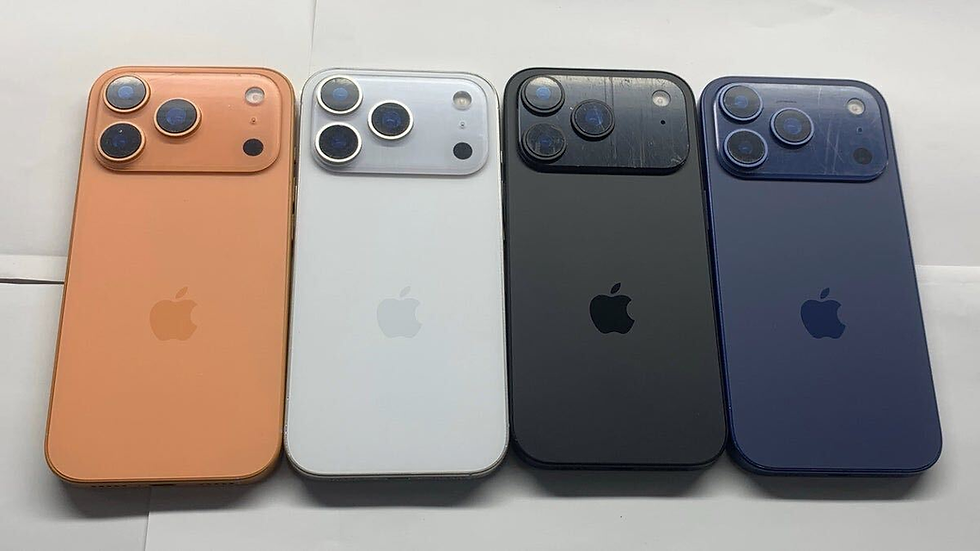
Potential “scratch issues” (spalling) on camera plateau: Early tear-downs show the anodized finish on edges near the camera module may wear under stress or abrasion. MacRumors+1
These upgrades offer improved performance and usability — but they also shift how repair work must be done.
4. Repairability & Internal Architecture Changes
As a repair shop, this is one of your strongest value propositions. Understanding how Apple has modified internal structure helps you anticipate challenges, choose tools, and price accurately.
4.1 Battery & Adhesive System
One of the biggest changes is the use of electrically debonding adhesive under the battery tray. Instead of pull tabs or aggressive prying, an applied current can soften adhesive bonds to safely detach the battery. Wccftech+1Moreover, the battery now sits in a screwed-in tray, which simplifies alignment and replacement. Wccftech
Pros:
Lower risk of puncturing battery when removed
Cleaner replacement process
Less collateral damage to adjacent components
Cons:
Requires specialized tools and knowledge
Risk of electrical damage if the debonding method is misused
4.2 Cooling & Thermal Architecture
The introduction of a vapor chamber cooling system in Pro models helps disperse heat more efficiently across the internal chassis, which is advantageous for sustained performance. WccftechHowever, this also means careful routing, heat spreaders, and shielding that a repair technician must be mindful of when re-assembling.
4.3 Access & Disassembly
Apple has removed the dual-entry point (i.e. there is no alternative back-access path). To reach most major internal parts—battery, logic board, cameras—you must remove the display first. WccftechThis complicates some repairs:
Screen removal risks further damage if done improperly
Internal cables and flexes must be handled with more care
The display itself becomes a “gatekeeper” component
4.4 Fasteners & Screw Types
Apple has introduced Torx-plus screws in multiple internal assemblies. That means you’ll need extra driver types. WccftechAlso, some ports (e.g. USB-C) are more intertwined with multiple modules—making replacements more time consuming. Wccftech
4.5 Repairability Score & Trade-Offs
Due to these changes, iFixit (and other teardown sources) give provisional repairability scores around 7/10. Some repairs are easier (battery), others more challenging (port replacements, internal modules). Wccftech+1
In summary: Apple made incremental strides toward easier battery replacement, but in many other areas, repair complexity has increased — making expertise and proper tools more important than ever.
5. Common iPhone 17 Repair Issues & Symptoms
Even the most robust phones face hardware failure or accidental damage. Here are the repair cases you’re likely to see in your shop for iPhone 17 devices.
Problem Area | Common Symptoms | Likely Cause(s) | Repair Strategy |
Screen / Display Issues | Cracks, unresponsive touch, flickering, black screen | Physical impact, flex cable damage, LCD or OLED fault | Replace display assembly with OEM or high-quality replacement; calibration & test |
Battery & Charging Problems | Rapid battery drain, phone shuts off, won’t charge, “charging but not powering” | Battery degradation, faulty charging port, faulty power IC | Run diagnostics, replace battery via tray, test current flow |
Charging Port / USB-C Issues | Loose connection, only works at certain angles, no data transfer | Bent pins, connector damage, corrosion | Replace flex or port module (careful rework) |
Camera Malfunction | Blurry images, focus issues, app crash, black camera view | Physical damage, module failure, software glitch | Replace camera module, test with apps |
Overheating / Thermal Throttling | Phone becomes hot under load, performance dips | Thermal system fault, poor heat conduction | Re-seat thermal shields, reapply thermal paste or pads |
Speaker / Microphone / Audio Problems | Low volume, distortion, no audio in calls | Damaged speaker mesh or flex, liquid damage | Replace audio modules, clean contacts |
Button / Sensor Failures | Volume, mute, power buttons unresponsive; proximity sensor misbehaving | Flex cable break, connector failure | Replace flex or sensor module |
Software / System Issues | Boot loop, random reboots, OS bugs | Corrupt OS, faulty firmware, logic board issues | Reinstall iOS, run diagnostics, repair logic board if needed |
Some of these issues (e.g. software or minor sensor faults) are quick to diagnose and fix. Others require full module replacement, calibration, and thorough testing.
6. Step-by-Step Repair Processes (for Technicians)
Below is a generalized repair workflow for a few high-demand repair types. Use this as a reference when training staff or estimating repair times.
6.1 Battery Replacement Workflow
Power off device completely
Remove pentalobe screws (if external)
Use a precision suction / opening kit to separate display
Disconnect display flexes carefully
Locate and unscrew the battery tray
Apply electrical debonding method to soften adhesive
Lift battery from tray gently
Place new battery in tray, apply screws
Reconnect display, test before full reassembly
Seal and secure the device
6.2 Display Replacement Workflow
Power off and open display
Disconnect all flex cables
Unscrew any mid-frame or shields
Remove the broken assembly
Transfer any modular components (e.g. earpiece, sensors)
Place new display, connect flexes
Test touch, display, Face ID (if present)
Seal device
6.3 Charging Port Replacement Workflow
Open device and disconnect relevant modules
Trace the flex and connector path (ports often share traces with other modules)
Remove screws and shielding
Gently desolder or detach the port module
Install replacement, reflow or secure connectors
Reassemble and test charging, data transfer
Important Notes / Tips for Each Process
Always test before full reassembly — avoid trapping a failing component inside.
Use anti-static environment and ESD protection.
Apply correct torque to screws; overtightening can crack components.
Label screw locations carefully — iPhone 17 uses multiple screw types.
After repair, run full diagnostics (battery health, thermal testing, sensors).
Because Apple’s internal layout has changed, older repair guides (for iPhone 16 or earlier) may not fully apply. Make sure your techs have access to up-to-date teardown / service manuals.
7. Genuine vs Aftermarket Parts: Risks & Best Practices
As a repair shop, part sourcing and quality are critical to your reputation and customer satisfaction.
7.1 Genuine (OEM / Apple-authorized) Parts
Pros:
Strict compatibility, often better durability
Lower risk of software/hardware conflicts
Better performance guarantee
Cons:
Higher cost
Harder to source early in new model cycle
7.2 Aftermarket / Third-Party Parts
Pros:
Typically lower cost
More readily available (especially in early days)
Cons / Risks:
Mismatched color, brightness, touch sensitivity, or calibration
Shorter lifespan (e.g. screen with ghosting, delamination)
Compatibility issues (e.g. Face ID, True Tone)
Warranties lower or nonexistent
7.3 Best Practices
Test every part before installation (bench test)
Use high-quality suppliers vetted for consistency
Keep a small margin for warranty or exchange
Keep records of parts used per customer job (for traceability)
Always calibrate, update firmware (where applicable), and run diagnostics
In communications to your customers, emphasize that your shop uses “high-grade OEM or carefully selected aftermarket parts” to build trust.
8. Preventive Maintenance Tips for iPhone 17 Owners
Offering preventive care advice not only helps your customers but also positions your shop as expert and value-driven.
Use a high-quality case and tempered glass / ceramic screen protector. Even with tougher glass, drops remain the top cause of screen damage.
Avoid exposing to extreme heat or moisture. While waterproofing is good, extended exposure can degrade seals.
Clean the charging port periodically. Use gentle compressed air or brush (while powered off) to remove dust and lint.
Avoid frequent fast-charging when not needed. It’s convenient, but high wattage charging regularly can degrade battery life over time.
Update iOS when stable versions are published. Apple often releases patches for battery, thermal, or performance issues.
Watch for early warning signs. If battery percentage drops faster than usual, or phone starts heating more, bring it in early — small repairs cost less than large ones.
By positioning your shop as a trusted adviser, you increase customer loyalty and reduce return repairs.
9. Pricing Estimates & Turnaround Time
While exact pricing depends on your region, overhead, and part sourcing, here’s a rough guideline you can adapt:
Service | Estimated Cost (USD) | Typical Turnaround Time |
Screen / Display Replacement | $200 – $350 | 1 – 2 hours |
Battery Replacement | $100 – $180 | 30 – 60 minutes |
Charging Port Replacement | $120 – $200 | 1 – 2 hours |
Camera Module Replacement | $150 – $250 | 1 – 2 hours |
Full Diagnostic / Logic Board Check | $50 – $100 | Same day |
Complex repairs (logic board, internal module failures) | Varies (labor + parts) | 1 – 3 days or more |
Notes / Tips:
Offer “express / priority” service options at a premium.
Always confirm part availability before quoting.
Include a post-repair warranty (e.g. 30 or 90 days) to give customer peace of mind.
Provide transparency: break down parts, labor, diagnostics.
You should localize pricing for your city / area, but the above gives you a template to publish or communicate with clients.
10. Why Choose a Professional Repair Shop
To help your website visitors convert (i.e., call or come in for repair), emphasize these value propositions:
Skill & Experience: New iPhones often have shifted internals; casual or inexperienced repair might lead to collateral damage.
Proper Tools & Facilities: Access to ESD-safe benches, special screening tools, correct screwdrivers, debonding equipment, etc.
Part Quality Assurance: We source premium parts and test them individually.
Warranty & Support: Our repair work includes a warranty, giving customers confidence.
Data Security: We handle devices with care, ensuring data protection.
Full Diagnostics: We don’t just replace parts — we inspect circuits, sensors, and other modules to prevent future issues.
When you write this section on your site, tailor it to your shop’s strengths (years in business, certifications, customer reviews, etc.).
11. FAQs (Frequently Asked Questions)
Q1: Is the iPhone 17 more fragile than previous models?A: While Apple has improved materials (Ceramic Shield, robust chassis), any smartphone is susceptible to shock, drops, or pressure. The risks remain, especially around glass surfaces and the camera plateau, which teardown experts warn is prone to spalling (chipping of anodized finish) under abrasive stress. MacRumors+1
Q2: Will Face ID or True Tone calibration fail after screen replacement?A: Using non-genuine parts or improper flex cable installation can trigger calibration issues. We always test and recalibrate before handing back.
Q3: How soon will aftermarket repair parts for iPhone 17 be widely available?A: As with past iPhone launches, high-quality aftermarket parts usually emerge within weeks to months. But in the early days, genuine or premium parts tend to command a premium.
Q4: Does the new battery tray make battery replacement trivial?A: It simplifies the process compared to prior models, but the electrically debonding method must be used carefully to avoid damaging nearby components.
Q5: Can I repair my own iPhone 17?A: While it’s possible, the internally complex layout, sensitive components, and changes in repair pathways make professional repair strongly recommended — especially to preserve warranties, data, and functionality.
12. Conclusion
The iPhone 17 introduces several internal and external changes compared to previous generations — not just in features like display and camera, but in how repairs must be performed. As a repair shop, you have the opportunity to showcase expertise by publishing well-informed guides like this, educating your clients, and converting them when they need service.
If you like, I can help you localize this article (insert your city, service area, contact info), optimize for your local SEO keywords (e.g. “iPhone 17 repair Baton Rouge”), or even produce blog, social, or flyer versions. Do you want me to adapt it for your region next?


Comments